
DUETT FULL Your Accompaniment1.0 - Google Play
You'll be able to see results in few seconds.
Publisher Description

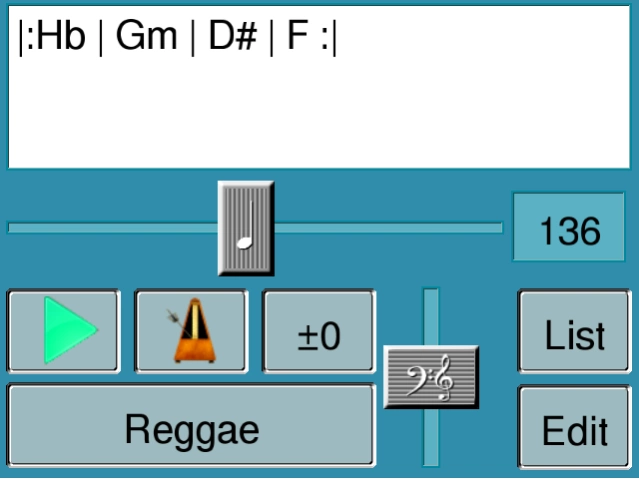
"Duett" supports students playing music instruments with a piano accompaniment.
The software "Duett" supports students playing music instruments with a piano accompaniment.
In the focus there is not an adding of a virtuous piano player, but a very simple and clear accompaniment. So also inexperienced musicians as well as children are able to start immediately with practicing.
You enter a chord chain text, select a piano style and a tempo. The app will play this accompaniment in an endless loop. You can transpose the chord chain and switch the volume ratio of bass to chord. You can turn on a metronom.
This FULL version...
....offers more chords: all variations of Major, Minor, Aug, Dim, 6, 7, maj7 and 9. You can enter chord chains with 2 chord each bar. Your chords chains will be saved to recall them. You can ajust tempo in fine scale, volume ratio of bass and chord in fine scale. You can create and save more "Piano Styles"
MANUAL:
Enter A Chord Chain:
Touch the chord chain field. Enter the letters
for Chord names and or <#> for "Flat" and "Sharp". Use for "Minor", <0> for "Dim" and <+> for "Aug" chords. Add a <6> <7> <9> for chord with four notes. If you want to have a bar with two different chords inside use the prefix <2> followed by two chords.
Easy Edit: You need not enter SPACES or Uppercase/Lowercase. Use H for Note B. Use Hb for Bb-Chord. Sample: "hb0gm72d#f+c" will become "|: Hb° | Gm7 | D# F+ | C :|" automatically.
Speed:
move the Slider to change speed from 40bpm to 240bpm.
Transpose:
Touch the "+/-" Button to change transpose from -5 upto +6 notes. Transpose only changes the audible result, not the chord chain text.
Metronom:
Touch the metronom button to add a metronom beat. The timing of the metronom depends on the selected style.
Style Selection:
DUETT can play your chord chain in 10 different piano styles (more will follow):
- simple 4/4 with only quarter notes.
- simple 3/4 with only quarter notes.
- Reggae Style
- 8-beat Pop
- Rock
- March
- Take Five 5/4
- Bossa Nova
- Slow Rock 6/8
- MyStyle
Bass/Chord Ratio:
Move the slider to change the ratio of bass to chord from: "more chord" to "more bass"
Creating New Style
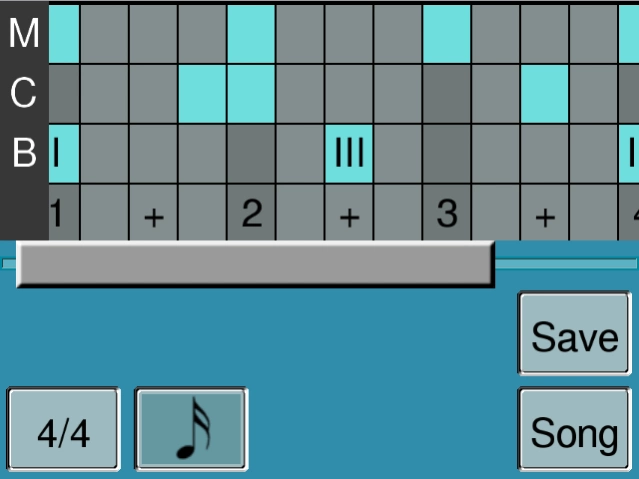
You can change the style "MyStyle". Touch the "EDIT" button. Select a length of the style from 3/4 upto 8/4. Select a fine resolution from 1/8, 1/8T, 1/16 upto 1/16T. "T" means "tribleds".
The top window shows a grid with three rows: M (Metronom), C (Chord) and B (Bass). The columns represent the timing positions in the style. Touch a position to add a event. Touch again to remove it.
The Metronom row offers two different events: "Click" and "Click + Bing"
The Bass row offers three different events: "I" (Base note), "III" (a Third), "V" (a Fifth)
If the style s longer than the screen, move the slider to reach all timing positions.
Touch "SAVE" to store your changes to MyStyle. Touch "SONG" to return to the Accompany mode.
About DUETT FULL Your Accompaniment
The company that develops DUETT FULL Your Accompaniment is Midimaster Software. The latest version released by its developer is 1.0.
To install DUETT FULL Your Accompaniment on your Android device, just click the green Continue To App button above to start the installation process. The app is listed on our website since 2013-07-24 and was downloaded 0 times. We have already checked if the download link is safe, however for your own protection we recommend that you scan the downloaded app with your antivirus. Your antivirus may detect the DUETT FULL Your Accompaniment as malware if the download link to com.midimaster.duettfull is broken.
How to install DUETT FULL Your Accompaniment on your Android device:
- Click on the Continue To App button on our website. This will redirect you to Google Play.
- Once the DUETT FULL Your Accompaniment is shown in the Google Play listing of your Android device, you can start its download and installation. Tap on the Install button located below the search bar and to the right of the app icon.
- A pop-up window with the permissions required by DUETT FULL Your Accompaniment will be shown. Click on Accept to continue the process.
- DUETT FULL Your Accompaniment will be downloaded onto your device, displaying a progress. Once the download completes, the installation will start and you'll get a notification after the installation is finished.
Program Details
System requirements
Download information
Pricing
Version History
version 1.0
posted on 2013-07-24
Disclaimer
Official Google Play Link
We do not host DUETT FULL Your Accompaniment on our servers. We did not scan it for viruses, adware, spyware or other type of malware. This app is hosted by Google and passed their terms and conditions to be listed there. We recommend caution when installing it.
The Google Play link for DUETT FULL Your Accompaniment is provided to you by apps112.com without any warranties, representations or guarantees of any kind, so access it at your own risk.
If you have questions regarding this particular app contact the publisher directly. For questions about the functionalities of apps112.com contact us.
